The Best Budget-Friendly Budget Tool
Are you looking for a budgeting tool that’s simple, effective, and cheap? Look no further. I am using Google sheets and it’s the most budget-friendly budget tool I have come across. In this post, I share my budgeting system which uses Google sheets.
In order to achieve financial independence, you need to have a budget. In the FI space, a well designed budget system is a must. A good budget is not something that has lots of fancy features. It just needs to be an effective system that you can commit to day after day. If you are looking for budgeting app, check out my post on the Best Budgeting Tools.
There’s nothing worse than an expensive, sophisticated budgeting app that you never use.
For me, the 3 most important criteria for budgeting tool are:
- Something that is budget-friendly
- Something that I can continue to use month after month
- Something that will help me make sound financial choices

My Budget-Friendly Budgeting Tool
I am using a Google sheet for my budgeting system. I used one of the templates that I purchased from here: Spreadsheet Mastery. It is a simple spreadsheet priced around 41 USD. You can use coupon code: POWERJ23 to get 10% discount.
Once you download the spreadsheet, it has the following tabs:
- Dashboard
- Accounts
- Budget
- Actuals
- Transactions
- Trends
- Bills
- Goals
- Settings
- Disclaimer
- Hidden tabs (Data, Calculations, Transaction Data Prep, Cat Analysis Data Prep)
To make it look simpler, here is another way to list the tabs:
| Category | Desc | Tabs |
| Reporting tabs | Used for viewing reports with pretty graphs | Dashboard, Trends, Actuals |
| Data entry tabs | Where you can enter your data. | Accounts, Budget, Transactions, Bills, Goals |
| Admin tabs | Where you do the admin stuff like setting your currency, your header color, starting year, etc. | Settings, Disclaimer |
| Hidden tabs | These are hidden tabs with formulas and data. If you are spreadsheet savvy you can adjust them and customize to your hearts desire | Data Calculations, Transaction Data Prep, Cat Analysis Data Prep |
How I Use The Template
I made slight customizations to suit my needs. But the steps are really simple and you can refer to their YouTube video to get started.
- I started with the Settings tab to enter my name and update currency.
- Then went to the Accounts tab to list out all of my bank accounts, investment accounts, Assets, Liabilities… after entering these in, you can see your net worth.
- The Budget tab is where I entered all my Income sources, Expense categories. The Savings section is a mirror reflection of what you entered in the Accounts tab. Just make sure they are identical. Now, you may not know at this time how much you need to put in for each expense category. It’s ok, just leave them blank for now if you don’t know. You can come back after you enter the actual transactions. Because once you enter the actuals, you will start to have some idea of how much to budget for each category.
- Enter your historical transactions into the Transactions tab – here you can go as far back as one month or 12 months. I went back 12 months just to see the trend. But, this of course took me a lot longer to finish. But, now that I have done it once, I can do it faster going forward.
- Once you are done with entering historical transactions, you can click on the Actuals to see how it looks. Just make sure that your “unallocated budget” row in the Transactions tab is showing all “0’s”. If it is showing something other than “0”, you need to check where there is an unallocated money somewhere.
- You can now use the past records as a guide to complete the Budget tab.
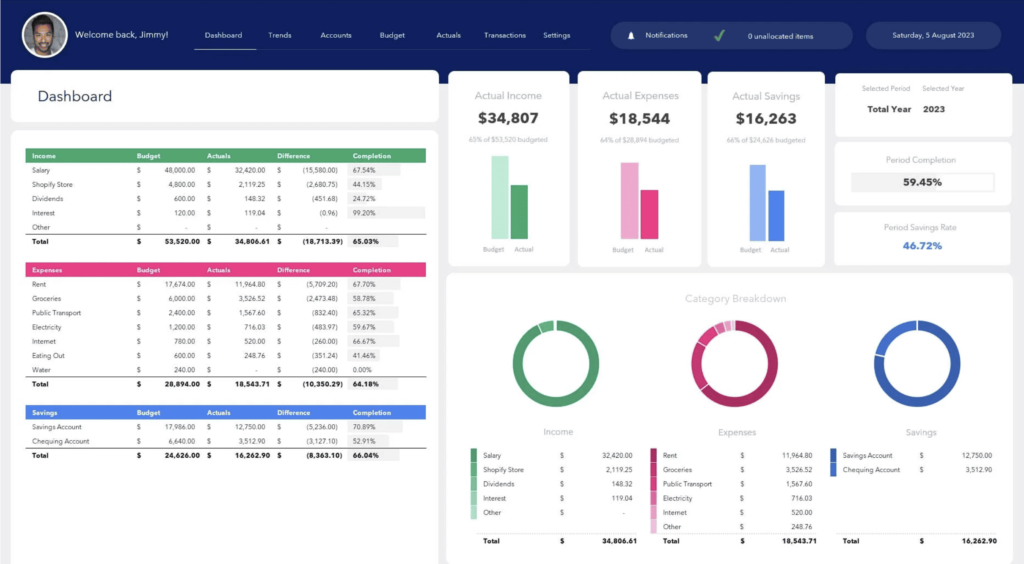
- With the Budget tab complete, you will be able to see the analysis in the Dashboard tab and the Trends tab.
- Now, I do not use the Bills or the Goals tab. These tabs are standalone tabs and not linked to other tabs so you don’t have to use them if you don’t want to.
- Lastly, make sure you at least review the numbers each month and update the Transactions tab.
- But, since the Transactions tab has all these formulas and calculations attached, I created my own tab called Worksheet 2024 to do all the slicing and dicing and reformatting of the data before moving it to the Transactions tab. This is because when you get the transaction details from your bank or credit card companies, they will not be in the format you can use right away. So, I just created some formulas to convert the data formats.
That’s it. Congratulation, you just did your budget!
Note On Credit Card Transactions
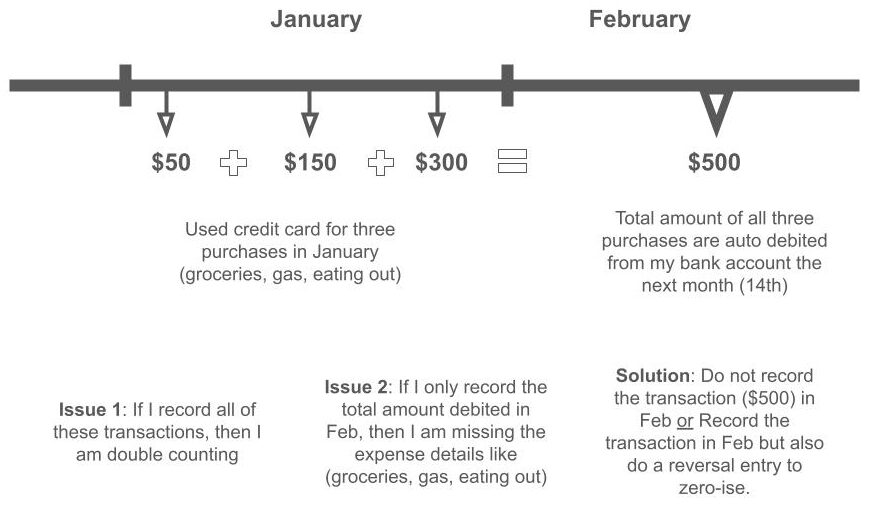
If you have credit card transactions, things can get a little tricky because your bank account will show deduction for your credit card bills the following month. So, this creates a timing gap (between when you actually used the credit card and when you are debited for the usage).
To circumvent this,
- I recorded the credit card transactions from the monthly credit card statement as negative transactions
- I recorded the checking account debit transaction as negative transaction
- now if I just stop here then I would essentially be double recording my expenses
- So, I then recorded a reversal entry by adding individual credit card transactions as a positive transaction to the credit card transactions.
- By recording a reversal entry, I am cancelling out one of the two negatives
Another option (a simpler option) would be to:
- Do not record the debit transaction on the bank account from credit card
- Wait until the credit card statement comes the next month to record the individual transactions
Hope this makes sense and hope this helps.
In Conclusion
Don’t think of budgeting as anything complicated. It needs to be simple and easily maintainable. And in my personal opinion, budget tool should not really cost much. I mean, paying every month for eternity isn’t very budget friendly, don’t you think?
Heads up – this page includes affiliate links. If you click and purchase from these links, I may receive a commission at no extra cost to you. Full transparency, I only recommend what I use personally.